Photobucket Photobucket Photobucket Photobucket
Tampilkan postingan dengan label windows. Tampilkan semua postingan

Senin, 12 September 2011

Windows Orient XP 2011

Kamis, 01 September 2011

Windows 8 Transformation Pack 1.0 - 12.51 Mb


Windows 8 UX Pack 2.0

THE BEST WAY TO GET WINDOWS 8 USER EXPERIENCE WITHOUT MODIFYING SYSTEM FILES

- Instantly dress up Windows 7 to upcoming Windows 8 in one minute
- Seemless installation and uninstallation giving user's confidence and security in system
- Easily configurable in single click with intelligence Metro UI design
- UxStyle memory patching
- Windows 8 Aero, Aero Lite or Metro theme
- Instant M3 and Metro wallpaper/logon screen customization
- UserTile with current user auto-configured on login
- Metro UI desktop emulation with pre-configured gadgets
- Aero's auto-colorization feature

You can run this program again to re-configure or uninstall. Tasks will be done instantly.


Credits:
UxStyle memory patching: http://uxstyle.com
Windows 8 Aero Lite theme: http://thepanda-x.deviantart.com
Windows 8 Aero theme: http://consume123.deviantart.com
Windows 8 Metro UI theme: http://pisadeviant.deviantart.com
Taskbar UserTile/Mosaic/Aura: http://angelwzr.deviantart.com


Thanks to:
Microsoft.com for their awesome future OS, Windows 8.
WinXSoft.com for providing official mirror and hosting.

And to you for using Windows 8 UX Pack :)
If you like this product, share it with your friends.


Website: http://www.WindowsXLive.net
Contact: lucifiar@hotmail.com
Author: Mr. Windows X


Changelog

2.0
-Added Aura for Aero's auto-colorization feature
-Added Mosaic for Metro UI desktop emulation with pre-configured gadgets
-Added Zetro UI 1.1 for Windows 8 Metro inspired UI
-Improved system versioning and dependency checking UI experiences
-Replaced UserTile picture options with Windows 8 features selection
-Updated desktop wallpaper to M3 from Windows 8 build 7989
-Updated Windows 8 Aero theme to build 7989 ones

1.0
-Initial release
download (mediafire)

Kamis, 25 Agustus 2011

Windows 7 Transformation Pack For XP

Senin, 08 Agustus 2011

Windows XP SP3 XC eXcellent v2.2 --2011--

Kamis, 04 Agustus 2011

Theme For Windows XP Aero 7 Theme

Minggu, 24 Juli 2011

Windows 7 ultimate collections


Windows 7 Ultimate SP1 Integrated July 2011 from Microsoft (32 Bit) | 2.53 GB

Spoiler for detail:
Windows 7 Ultimate is the most versatile and powerful edition of Windows 7. It combines remarkable ease of use with the entertainment features of Home Premium and the business capabilities of Professional, including the ability to run many Windows XP business programs in Windows XP Mode. For added security, you can encrypt your data with BitLocker Drive Encryption and BitLocker To Go. And for extra flexibility, you can work in any of 35 languages. Get it all with Windows 7 Ultimate.

This version base on Windows 7 Ultimate SP1 from MSDN, included IE9 and all latest update for Windows 7 Ultimate 32bit.

List Updates:

IE9-Windows6.1-KB2530548-x86
Windows6.1-KB2425227-x86
Windows6.1-KB2446710-x86
Windows6.1-KB2476490-x86
Windows6.1-KB2478662-x86
Windows6.1-KB2479943-x86
Windows6.1-KB2484033-x86
Windows6.1-KB2488113-x86
Windows6.1-KB2491683-x86
Windows6.1-KB2492386-x86
Windows6.1-KB2503665-x86
Windows6.1-KB2505438-x86
Windows6.1-KB2506212-x86
Windows6.1-KB2506928-v2-x86
Windows6.1-KB2507618-x86
Windows6.1-KB2507938-x86
Windows6.1-KB2508272-x86
Windows6.1-KB2509553-x86
Windows6.1-KB2510531-x86
Windows6.1-KB2511250-x86
Windows6.1-KB2511455-x86
Windows6.1-KB2515325-x86
Windows6.1-KB2522422-x86
Windows6.1-KB2530548-x86
Windows6.1-KB2532531-x86
Windows6.1-KB2533552-x86
Windows6.1-KB2534366-x86
Windows6.1-KB2536275-x86
Windows6.1-KB2536276-x86
Windows6.1-KB2541014-x86
Windows6.1-KB2544521-x86
Windows6.1-KB2544893-x86
Windows6.1-KB2545698-x86
Windows6.1-KB2547666-x86
Windows6.1-KB2555917-x86


Link update from Homepage:


Check MD5 Hash before intall:

File: 7Sp1July11.iso
MD5: 961cefd01eb0ad59d1e8d0b59885ffe9


Windows 7 Ultimate x86/x64 ENG/ISO | 900 MB

Spoiler for tutorial instal:
STEP-BY-STEP TUTORIAL FOR CLEAN INSTALLATIONS
BACK UP
1. Back up all Files/Data to DVD/CD/External Hard Drive/etc .

BURN TO DVD:
1. Scroll down to Nero Section below
2. Follow the instructions i have posted on how to burn this to DVD

SET YOUR DVD DRIVE AS THE FIRST BOOT DEVICE

1. Insert the burnt DVD into your DVD Drive
2. Restart your computer
3. As soon as your computer clicks over to begin the Boot Process
4. Continuously press the ESC
5. That will bring up the BIOS
6. Look around in there for the Boot Sequence/Order and make the "DVD Drive the First Boot Device
7. Save and Exit the BIOS
8. If you did it correctly.. your computer will say Press any button to boot from DVD
9. Press any button
10. That will launch the Windows 7 installation process


Windows 7 Ultimate SP1 x64 ENG/ISO/Final | 3 GB

Spoiler for detail:
Introducing you build Windows 7 Ultimate x64. Based on originolnyh images from MSDN. Integrated English language pack, updates on June 1, 2011. When the installation is getting activated and registered version of Windows 7 Ultimate, which is being tested for validity at Microsoft. Net system - drivers, additional software is not been integrated.

System Requirements:
- 32-bit (x86) or 64-bit (x64) processor with 1 GHz.
- 1 GB of RAM.
- Support for DirectX 9 interface with the driver WDDM, at least 128 MB of graphics memory, Pixel Shader 2.0 in color and 32 bits per pixel.
- Hard disk capacity of 40 GB to 16 GB of free disk space.
- A DVD-ROM drive.

Windows 7 Royale XP Super CD

Windows XP SP3 DarkLite Edition II - 2011


Release Information :

The best XP OS in 2011 have all update at December have a great graphic from "Catalog" designer
Original, updateable and activated no need serial , bootable ...

VIP Note :

The Develpoer made two versions
* SATA Version (have all updates and SATA driver only)
* Driver Version (have all updates, SATA driver and all cheapest driver only)

This one here is SATA Version cuz its smaller (510 MB) and more faster than any other version.
Spoiler untuk download:
http://www.maknyos.com/lx3ibtvc6chx/Windows.XP.SP3.Dark.Lite.Edition.SATA.2011-UrbanSteel.part1-maknyos.com.rar.html

http://www.maknyos.com/9abci3q9akt4/Windows.XP.SP3.Dark.Lite.Edition.SATA.2011-UrbanSteel.part2-maknyos.com.rar.html

http://www.maknyos.com/hxi46zea0g3b/Windows.XP.SP3.Dark.Lite.Edition.SATA.2011-UrbanSteel.part3-maknyos.com.rar.html

Windows XP SP3 Final lite 2011 v1.0

Windows XP v6 MacOSX (XP aroma apel,,, hehe)

windows yang satu ini dapet rating yg cukup tinggi... dari segi tampilan keren banged dah... gak perlu lg nginstal software buat mempercantik tampilan XP anda ky windowblinds ato yg sejenis... ceritanya ane gak sengaja ngubek² situsnya orang thailand,,, eh nemu yg beginian... pas ane coba keren juga,,, bahkan bisa dibilang keren banged.. ini nih situsnya kalo penasaran »(http://www.softvnn.com/forum/threads/253450-softvnn-windows-xp-sp3-v6-macosx-%5Bbuild-01-12-2010%5D/page41),, nah loh keriting gak rambut ente ngebaca bahasa orang thailand,wkwkwk.... balik lagi ke topik, ukuran filenya pun gak gede² amat, cukup lah di burn di CD... oh iya, sedikit tips.. kalo masukin password buat extrak sebaiknya diketik manual,, jangan di copas.. langsung aja noh klik spoiler dibawah buat ngelihat screenshoot ama link downloadnya...
Spoiler untuk screen shoot:

DOWNLOAD (media fire)
pass : softvnn.com

Sabtu, 23 Juli 2011

Windows Serials


hahaha... artikel kali ini gak nanggung²... ane dapet dari forum sebelah... monggo buat yg lg butuh serial windows,,, baik itu XP,vista,ataupun windows 7... komplit sodara²...
silahkan:
FJGCP-4DFJD-GJY49-VJBQ7-HYRR2 - Windows 7
6PB94-MC2C6-4F37H-KTJ32-PF2PT - Windows 7
H8KXB-V8KD3-KWWG8-8WXRH-PMF7T - Windows 7
36Q3Y-BBT84-MGJ3H-FT7VD-FG72J - Windows 7
22TKD-F8XX6-YG69F-9M66D-PMJBM - Windows 7
2QBP3-289MF-9364X-37XGX-24W6P - Windows Vista
T46TR-B7TFB-HY3GK-FBWKD-4Y93W - Windows XP
FJGCP-4DFJD-GJY49-VJBQ7-HYRR2 - Windows 7
C43GM-DWWV8-V6MGY-G834Y-Y8QH3 - Windows 7
JYRDG-HHGYV-XCFGJ-22FDH-8BWP3 - Windows Vista
6PFJK-WKXQR-9Q27C-6CWD7-MQ3CQ - Windows Vista
FJGCP-4DFJD-GJY49-VJBQ7-HYRR2 - Windows 7
VYG6P-M3PR8-TYGWC-YW4QG-7RP2B - Windows XP
7FMM3-W4FMP-4WRXX-BKDRT-7HG48 - Windows XP
HYHV7-W343F-9TCCK-JPCBM-B2FQ8 - Windows XP
22TKD-F8XX6-YG69F-9M66D-PMJBM - Windows 7
RWMVV-6J7QM-JCP43-7F4FQ-YKP4Q - Windows XP
342DG-6YJR8-X92GV-V7DCV-P4K27 - Windows 7
FJGCP-4DFJD-GJY49-VJBQ7-HYRR2 - Windows 7
22TKD-F8XX6-YG69F-9M66D-PMJBM - Windows 7
V2C47-MK7JD-3R89F-D2KXW-VPK3J - Windows XP
4GPTT-6RYC4-F4GJK-KG77H-B9HD2 - Windows Vista
3KFB7-X2Q3M-6MWFX-W2Y7V-C7M9D - Windows XP
K2KB2-BDBGV-KP686-D8T7X-HDMQ8 - Windows XP
CG4FW-K9943-MHRHG-QHTWM-F4V3J - Windows XP
27WDG-2G9G2-BTVMF-W4KCX-9F8PX - Windows Vista
KRHGQ-F7K2V-7VDMW-GVYWG-JDCWT - Windows XP
RDJXR-3M32B-FJT32-QMPGB-GCFF6 - Windows 7
6DX2X-QR7XB-3RBY2-BGQ2R-DR9M6 - Windows Vista
22TKD-F8XX6-YG69F-9M66D-PMJBM - Windows 7
THMPV-77D6F-94376-8HGKG-VRDRQ - Windows XP
3YGKH-CXD3K-K44PM-J2QG4-QJMVF - Windows Vista
6JWV3-843DD-4GV68-6D8JB-G6MF9 - Windows Vista
VFC8R-FCVQH-KVW2Y-T66HV-XTTWD - Windows XP
FJGCP-4DFJD-GJY49-VJBQ7-HYRR2 - Windows 7
V2C47-MK7JD-3R89F-D2KXW-VPK3J - Windows XP
2V3W2-JXTTR-28RD8-R228D-KR69C - Windows 7
6JWV3-843DD-4GV68-6D8JB-G6MF9 - Windows Vista
342DG-6YJR8-X92GV-V7DCV-P4K27 - Windows 7
3YGKH-CXD3K-K44PM-J2QG4-QJMVF - Windows Vista
T6FQX-MWJX4-BDWVG-33T78-VFDFQ - Windows XP
CM84R-24P6T-FCF9Y-KFBH2-V6Y2Y - Windows XP
VDDF2-JJWM3-X7P27-FRHRT-8BVHT - Windows XP
MYFFD-PJP7T-J8BM6-MXPH6-3R2BW - Windows XP
2P6PB-G7YVY-W46VJ-BXJ36-PGGTG - Windows 7
YWJDK-QF8MF-C6JCQ-9RHHY-PQCJ4 - Windows Vista
6DG3Y-99KMR-JQMWD-2QJRJ-RJ34F - Windows Vista
MR49R-DRJXX-M6PX2-V96BF-8CKBJ - Windows XP
GDJTB-RXD98-CPGQF-4XJ6K-MG2X6 - Windows 7
KG27H-JV9M6-2CXKV-GMP22-HF2BQ - Windows XP
22TKD-F8XX6-YG69F-9M66D-PMJBM - Windows 7
6JWV3-843DD-4GV68-6D8JB-G6MF9 - Windows Vista
V3BVK-VD8RB-K7WXC-H6J9F-GXYFM - Windows XP
6K76Y-6WMBQ-FDP2F-6Q66H-H2HYX - Windows Vista
RDJXR-3M32B-FJT32-QMPGB-GCFF6 - Windows 7
22TKD-F8XX6-YG69F-9M66D-PMJBM - Windows 7
HYF8J-CVRMY-CM74G-RPHKF-PW487 - Windows 7
33PXH-7Y6KF-2VJC9-XBBR8-HVTHH - Windows 7
THMPV-77D6F-94376-8HGKG-VRDRQ - Windows XP
2R6WF-KYF88-27HYQ-XTKW2-WQD8Q - Windows Vista
342DG-6YJR8-X92GV-V7DCV-P4K27 - Windows 7
FHY4Q-VB63H-XK8VD-9Y68P-RFQ43 - Windows 7 Ultimate
J6C9R-C9HHG-3CWTY-Y4MPW-CD72J - Windows 7 Ultimate

Kamis, 14 Juli 2011

Windows XP Pro Gamer Edition

Windows XP SP3 5512 Pro Gamer Edition v2 ini telah ditambahkan beberapa aplikasi tambahan seperti Internet explorer 8, Windows media player 11, Firefox 3.5.3, Kels runtimes 5.8, Flash Player 10, Java 6 update 16, Shockwave 11, Klite mega pack 5.1.0, c++ 2005, AMD k8 processor driver 1.2, SetPoint 470, Gamebooster 1.2.1, Xfire 1.114, Avg antivirus 8.5.392, Winrar 3.90 regged, Directx 9, dan Directx 10. Jadi untuk para pecinta gamer anda harus menggunakan sistem operasi yang telah didukung khusus untuk bermain game ini dan perlu anda ketahui pula bahwa Anda tidak perlu mencari driver lagi karena semua driver telah terinstal (pre-installed) seperti:
Driverpacks base 8.12.5
* MassStorage 9.0.1 txt mode (sata + raid)
* Cpu 8.0.4
* Chipset 9.0.2
* Graphics A 9.06
* Graphics B 9.06
* Graphics C 8.12.1
* Lan 8.12.1
* Sound A 8.0.5
* Sound B 8.0.5
* Wlan 8.0.6
* Graphics A languages 9.06
* Graphics A physX 9.06
* Monitor 81022
* Sp3 hd audio 00002
* Wireless 00002

Windows XP professional Sp3 Build 5512 sebagai bahan dasar dibuatnya gamer edition ini dengan bahasa default berbahasa inggris namun Anda dapat mengubah ke bahasa pilihan sendiri sewaktu instalasi. Tetap akan saya pisahkan serial number Windows XP Pro Gamer Edition v2 ini adalah MR49R-DRJXX-M6PX2-V96BF-8CKBJ jika sewaktu waktu anda memerlukannya tetapi sebenarnya anda tidak perlu melakukan pengisian SN sewaktu instalasi OS ini karena sudah full activated. Dibawah ini beberapa fitur dan folder yang telah dihapus yakni:
- SUPPORT,VALUEADD,DOCS,WIN9XMIG,WIN9XUPG,WINNTUPG.
- Accessibility options
- Briefcase
- Calculator
- Charmap
- Clipbook viewer
- Games
- Internet games
- paint
- Pinball
- screensavers
- Wordpad
- Cameras and camcorders
- Printers
- Scanners
- Tape drives
- Luna theme
- additional mouse cursors
- Movie maker
- Music Samples
- Speech support
- Tablet pc
- windows defualt sounds
- Frontpage extensions
- MSN Explorer
- Outlook express
- Windows Messenger 4.7
- colour schemes
- desktop cleanup wizard
- Search assistant dog
- Tour
- Fax service

jadi harap melakukan instalasi dari sistem boot dengan DVD. karena ini bukan upgrade disk.

Kamis, 09 Juni 2011

all collection windows XP


bagi yg suka windows XP,,, ne ane sharing be²rapa jenis windows XP.. lumayan kan bisa nambah² koleksi..
langsung aja...


Windows XP Dark Edition 7 SP3 SATA Driver Activated


windows XP versi ini yg mendapat rating 5 bintang... tampilanya emg keren...


tertarik??? langsung aja gan di sedot


Windows XP Pro SP3 Gold Cobra Edition


inipun tak kalah manis ama yg diatas...


yuk mariiiiiii... langsung sedot...

http://www.filesonic.com/file/134711591/XP.GoldCobra.2010.part6.rar


Windows XP Vortex – Most Beautiful XP with Ultimate Vista Look


merah?? meriah euy...... hahaha


sedooooottttttt.....


Windows XP SP3 Lite Netbook Edition (160Mb Only)


ane nyebutnya ini versi enteng,,, bagi yg punya netbuk/PC dengan performa yg kurang jreng, dengan RAM yg sangat kecil,,, versi ini cocok banged... proses instal hanya butuh waktu 11 menit..
langsung aja klo agan² tertarik,,, monggo disedot..

http://www.filesonic.com/file/135530261/XP.SP3.Lite.part2.rar


Microsoft Windows XP Professional SP3 Integrated March 2011


gak perlu ane jelasin kali yak?? hmmmm... tp gpp ane jelasin sedikit,,, ini dah update, maret 2011 sodara².... versi ini juga gak perlu masukin key sewaktu instal,,, 100% genuin deh pokonya...

langsung sedot deh dijamin gak nyesel....


Windows XP SP3 Final Lite v3.0 + Fast Blazing Windows XP


versi ini mirip sama yg buat netbuk tadi,,, pas buat PC jadul dengan kapasitas RAM yg sangat rendah... proses instalasi pun hanya memakan waktu skitar 10 menit...
yuk mariii.......

http://www.filesonic.com/file/295493321/WinXP.SP3Lite.part2.rar


Windows XP SP3 DarkLite Edition 2011 – SATA Version Activated


versi yg sangat digemari.... lebih enteng drpd dark editions... soalnya gak pake software² tambahan...
kalo menurut ane,, agan² harus punya versi yg atu ini... kalo enggak dijamin gak kenapa²... wkwkwk
langsung aja gan......

http://www.filesonic.com/file/473852614/WinXP.DarkLite.2011.part4.rar


sementara ini dulu yg ane sharing,,,, mata dah ngilu banged seharian didepan PC... 

oh ya,,, semua versi diatas selama proses instalasi gak ada acara masukin key,,, jd agan2 gak usah sibuk nyari key'nya... 
akhir kata,,, bubay.....

Sabtu, 18 Desember 2010

instal uLang windows XP dengan USB flashdisk

kemaren dpt PR dari si mamah, netbuknya sekarat.. jd perlu di instal ulang...

waduh pening juga... akhirnya terpaksa gw harus tanya mbah gugeL...

disuruhnya gw berkelana dari blog atu ke blog laen... dpt juga ternyata...

emang mbah gugeL tiap ngasih nasehat gak pernah meleset.. :D

karna gw orang yg baek budi tp tidak suka menabung... jd kalo dpt iLmu langsung gw sharing...

langsung aja yak sodara2 kita mulai...

seperangkat alat yg wajib dipersiapkan adalah...


2. USB flashdisk, kalo bisa yg lebih dari 1GB

3. CD master windows XP, kalo bisa yg genuine yak

4. Komputer yg sehat wal'afiat, tanpa menderita penyakit apapun


kalo dah komplit mari kita laksanakan....

1. masukan flashdisk dan juga CD master ke komputer yg sehat wal'afiat..

2. extract file yg barusan di dunlud tadi.....

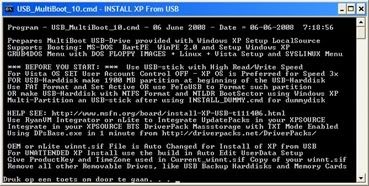
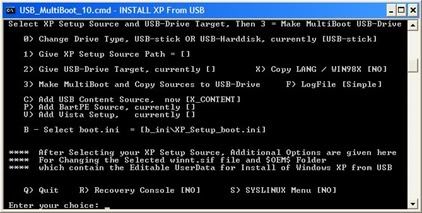
3. jalankan USB_MultiBoot_10.cmd, ntar bakal nongol yg kayak gini 


4. lalu tekan enter, gambarnya jd ky gini deh...


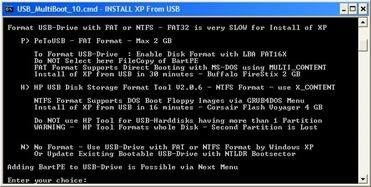
5. akan muncul beberapa pilihan, tp gak usah bingung... bakal gw kasih tau pilihanya wkwkwk
    tekan H sodara2.. kemudian tekan ENTER... akan nongol tuh yg ky dibawah...


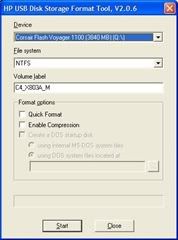
6. nah itu buat format flashdisk sodara2... pada pilihan file sistem, pilih NTFS dan centang quick format.. truz klik start...

7. setelah proses format selesai tutup kotak dialod format td, tp jangan ditutup yg menu comand..

8. kita kembali ke menu comand... lagi2 ada beberapa pilihan... tetap tenang, gw masih disini kok hohoho


9. ketik angka 1 truz tekan enter... tujukan dimana drive CD windows XP terletak...

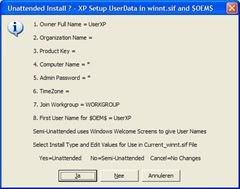
10. nah kemudian dan pasti akan nongol yg kayak beginian..


11. pilih NO... truz isi user XP, seri number, nama komputer dan laen sebagainya...

12. kalo udah diisi semua maka akan kembali ke menu comand... kali ini tekan 2 trus enter, trus tujuin lokasi flashdisk berada...

13. balik lg ke menu comand..  tekan 3 truz enter... proses copy udah dimulai... harap sabar...

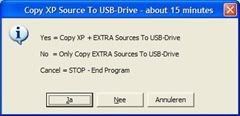
14. selama proses copy akan nongol jg yg kaya beginian...


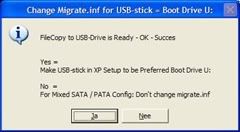
15. pilih YES, lanjut lagi... dan ternyata nongol lg yg beginian...


16. kali ini saatnya untuk berkata tidak... pilih NO sodara2....!!!

17. akhirnya kelar juga proses copy... tekan sembarang tombol di keyboard biar menu comand keluar...


nah sekarang bisa anda instal uLang netbuk sodara2 pake flashdisk barusan...

pada saat boot arahkan pada USB flashdisk,, kalo netbuk si mamah td gw tekan F2 trus muncul pilihan boot..

gak tau neh di netbuk elu2 pade ditekan apaan... wkwkwk

oh ya atu agi... pada saat booting dengan flashdisk, akan terdapat pilihan... 

pilih yg nomer 1... kalo gak salah alias bener tulisanya ky gini nih

BEGIN TXT MODE SETUP WINDOWS XP

kemudian instal seperti biasanya... kalo masih gak bisa cara instal kebangetan... >.<

Minggu, 12 Desember 2010

key windows XP 100% genuine

Sabtu, 11 Desember 2010

windows XP black editions


kalo pengen tampilan ky diatas, langsung aja klik gambar dibawah


kalo file diatas udah di download, bakar pake software dibawah ini..